

计算机网络-TCP socket编程-实现客户和服务器——沐雨先生
实验内容
1.编写TCP server
2.编写TCP client
3.使用Wireshark抓取并解读TCP三次握手报文段
4.使用Wireshark抓取并解读TCP数据传输报文段
5.使用Wireshark抓取并解读TCP释放连接报文段
基本要求
1.了解TCP server socket与TCP client socket之间的通信过程
2.学会使用Java语言编写服务程序
3.学会使用Java语言编写客户程序
4.理解TCP三次握手
5.理解TCP的可靠传输过程
6.理解TCP的连接释放过程
相关知识
TCP上的server与client之间的通信过程
TCP上的server与client之间的通信过程如下图所示: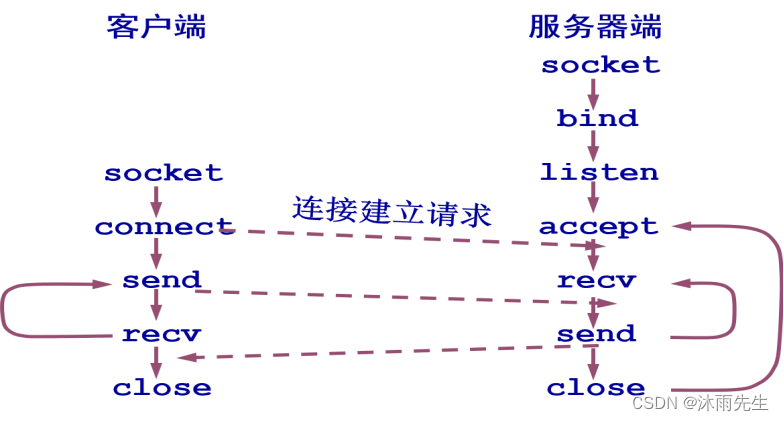
Java应用程序建立一个TCP server的步骤(参看帮助文档)
(1)创建ServerSocket对象,方法之一是
public ServerSocket(int port,int backlog, InetAddress bindAddr) throws IOException
例如,建立一个server socket, 并绑定到指定端口port和ip:
String ip=”192.168.1.101”;
int port = 12345;
ServerSocket ss1 = new ServerSocket(port,1,InetAddress.getByName(ip));
(2)调用ServerSocket的accept()方法,监听向本socket发送的连接请求并接受这个请求。此方法在连接建立之前处于阻塞状态。其方法头是
public Socket accept() throws IOException, 例如语句
Socket connection = ss1.accept();
accept()方法返回一个Socket类型的引用,即connection的类型是Socket。可调用Socket的getInetAddress(),getPort()方法得到对方的IP地址和端口号,例如
connection.getInetAddress().getHostAddress() //得到对方IP地址
connection.getPort() //得到对方端口号
(3)调用Socket的getInputStream()方法,返回此socket的输入流,用于读入数据。其方法头是
public InputStream getInputStream() throws IOException,例如
InputStream input= connection.getInputStream();
调用InputStream的read方法接收对方数据,例如语句
byte[] recv = new byte[1024];
int n = input.read(recv);
从输入流读入输入数据,存放在recv字节数组中,read方法返回本次实际读入的字节数。下列语句可获得recv中实际接收的字节。
byte[] message = new byte[n];
//message存放recv中实际接收的字节
System.arraycopy(recv, 0, message, 0, n);
(4)调用Socket的getOutputStream()方法,返回此socket的输出流,用于写数据。其方法头是
public OutputStream getOutputStream()throws IOException,例如
OutputStream output= connection.getOutputStream();
调用OutputStream的write方法向对方写数据,例如
output.write(recv);
向输出流写入存放在recv字节数组中的数据。
(5)传输结束后,关闭所有资源,例如
input.close();
output.close();
connection.close();
Java应用程序建立一个TCP client的步骤(参看帮助文档)
(1)创建一个Socket对象,例如
Socket s = new Socket();
(2)调用Socket的connect方法,将此socket与服务器建立连接,connect()方法头如下
public void connect(SocketAddress endpoint)
throws IOException,例如语句
int port = 13346;
String ip = “192.168.1.102”;
s.connect(new InetSocketAddress(InetAddress.getByName(ip),port));
与ip,port指定的socket建立连接。
(3)调用Socket的getOutputStream()方法,返回此socket的输出流,用于写数据。
getOutputStream()方法头是
public OutputStream getOutputStream()throws IOException,例如
OutputStream output=s.getOutputStream();
调用OutputStream的write方法向对方写数据,例如
output.write(“Hello,Server!”.getBytes());
将字符串”Hello,Server!”转换为字节数组,写入输出流。
(4)调用Socket的getInputStream()方法,返回此socket的输入流,用于读入数据。
getInputStream()方法头是
public InputStream getInputStream() throws IOException,例如
InputStream input= s.getInputStream();
调用InputStream的read方法接收对方数据,例如
byte[] recv = new byte[1024];
int n = input.read(recv);
从输入流读入输入数据,存放在recv字节数组中,read方法返回实际读入的字节数。下列语句可获得recv中实际接收的字节。
byte[] message = new byte[n];
//message存放recv中实际接收的字节
System.arraycopy(recv, 0, message, 0, n);
(5)传输结束后,客户关闭所有资源。
input.close();
output.close();
s.close()
实验步骤
第1部分 编辑和调试客户和服务程序
本实验建立TcpServer.java和TcpClient.java。运行TcpServer后,TcpServer等待TcpClient的连接请求,连接成功后TcpClient向TcpServer发送“Hello,Server!191491614余德华”,TcpServer收到此消息后再将消息重新发回给TcpClient。
进入Dos命令提示符,键入命令
netstat -ano
查看已被占用的TCP端口列表。实验程序中TCP服务器使用的端口号不能出现在已占用端口列表中,应确保TCP服务器使用的端口未被使用。
- 打开NetBeans,在前面的实验中,我们曾在“D:\”盘下建立了一个Java Application项目,项目名称是javanetwork,项目所在文件夹是d:\javanetwork。本实验需要在此项目下建立一个名为demo.tcp的包,在此包下建立服务器程序TcpServer.java,可参考Java应用程序建立一个TCP server的步骤。运行TcpServer后,TcpServer等待TcpClient的连接请求。你的TcpServer运行后输出窗口内容应与如下截图类似:
- 参考Java应用程序建立一个TCP client的步骤,在demo.tcp包下建立客户程序TcpClient.java。TcpClient向TcpServer发送连接请求,连接完成后向TcpServer发送"Hello,Server!";TcpServer接收此消息后再将其发回给TcpClient,TcpClient接收并显示这个消息。你的TcpClient运行后输出窗口内容应与如下截图类似:
第2部分 抓包
A,B两名同学的电脑一组。
- 打开Wireshark,选择接口(网卡)为以太网(或WLAN)。点击“捕获”->”选项”,不勾选“在所有接口上使用混杂模式”,点击“开始”按钮开始抓包;
- A同学主机运行TcpServer.java;
- B同学主机运行TcpClient.java;
- 停止Wireshark抓包;
- 在Wireshark找到与本次TCP通信有关的所有帧,针对这些帧回答下列问题。
提示:可以使用过滤表达式tcp过滤包含TCP报文段的帧。下面这些表达式可供你参考:
过滤表达式1:(tcp.srcport==55233 and tcp.dstport==80) or (tcp.srcport==80 and tcp.dstport==55233)
过滤表达式2:tcp.flags.syn == 1
过滤表达式3:tcp.flags.ack == 1
可以用下述方法获得TCP段首部某个字段在Wirshark中的名称,以TCP源端口(Source port)字段为例:
在下面Wirshark界面截图中,点击任意一个包含TCP段的帧,例如编号为360的帧,展开
Transmission Control Protocol(即TCP),鼠标双击Source Port:http(80),在左下角状态栏中显示tcp.srcport(红框标记处),则tcp.srcport就是TCP源端口字段在Wirshark中的名称,采用这个方法可以获取所有字段在Wirshark中的名称。