vscode 突然连接不上服务器了(2024年版本 自动更新从1.85-1.86)
vscode日志
ll@192.168.103.5's password:]0;C:\WINDOWS\System32\cmd.exe [17:09:16.886] Got some output, clearing connection timeout [17:09:16.887] Showing password prompt [17:09:19.688] Got password response [17:09:19.688] "install" wrote data to terminal: "******" [17:09:19.705] > [17:09:20.326] > 845c52815b32: running [17:09:20.388] > Missing GLIBC >= 2.28! [17:09:20.403] > Found version ldd (Ubuntu GLIBC 2.27-3ubuntu1.5) 2.27 > 845c52815b32$$1$$ > Acquiring lock on /home/ll/.vscode-server/bin/05047486b6df5eb8d44b2ecd70ea3b > df775fd937/vscode-remote-lock.ll.05047486b6df5eb8d44b2ecd70ea3bdf775fd937 > Installing to /home/ll/.vscode-server/bin/05047486b6df5eb8d44b2ecd70ea3bdf77 > 5fd937... [17:09:20.432] > 845c52815b32%%1%% > Downloading with wget [17:09:22.662] > Download complete [17:09:22.679] > 845c52815b32%%2%% > tar --version: > tar (GNU tar) 1.29 > Copyright (C) 2015 Free Software Foundation, Inc. > License GPLv3+: GNU GPL version 3 or later . > This is free software: you are free to change and redistribute it. > There is NO WARRANTY, to the extent permitted by law. > > Written by John Gilmore and Jay Fenlason. [17:09:23.966] > Checking /home/ll/.vscode-server/.05047486b6df5eb8d44b2ecd70ea3bdf775fd937.l > og and /home/ll/.vscode-server/.05047486b6df5eb8d44b2ecd70ea3bdf775fd937.pid > for a running server [17:09:24.035] > Starting VS Code Server... "/home/ll/.vscode-server/bin/05047486b6df5eb8d44b > 2ecd70ea3bdf775fd937/bin/code-server" --start-server --host=127.0.0.1 --accept-s > erver-license-terms --enable-remote-auto-shutdown --port=0 --telemetry-level all > &> "/home/ll/.vscode-server/.05047486b6df5eb8d44b2ecd70ea3bdf775fd937.log > " < /dev/null > The VS Code Server log file is /home/ll/.vscode-server/.05047486b6df5eb8d44b > 2ecd70ea3bdf775fd937.log > printenv: > SHELL=/bin/bash > PWD=/home/ll > LOGNAME=ll > HOME=/home/ll > LANG=en_US.UTF-8 > VSCODE_AGENT_FOLDER=/home/ll/.vscode-server > SSH_CONNECTION=192.168.22.82 58621 192.168.103.5 22 > USER=ll > SHLVL=0 > XDG_SESSION_ID=252 > XDG_RUNTIME_DIR=/run/user/1007 > SSH_CLIENT=192.168.22.82 58621 22 > PATH=/usr/local/sbin:/usr/local/bin:/usr/sbin:/usr/bin:/sbin:/bin:/usr/games > :/usr/local/games:/snap/bin > DBUS_SESSION_BUS_ADDRESS=unix:path=/run/user/1007/bus > MAIL=/var/mail/ll > OLDPWD=/home/ll/.vscode-server/bin/05047486b6df5eb8d44b2ecd70ea3bdf775fd > 937 > _=/usr/bin/printenv [17:09:24.043] > > rm: cannot remove '/home/ll/.vscode-server/.05047486b6df5eb8d44b2ecd70ea3bdf > 775fd937.token': No such file or directory > Spawned remote server: 18606 [17:09:24.059] > > Waiting for server log... [ [17:09:38.604] > > * > * Visual Studio Code Server > * > * By using the software, you agree to > * the Visual Studio Code Server License Terms (https://aka.ms/vscode-server-lice > nse) and > * the Microsoft Privacy Statement (https://privacy.microsoft.com/en-US/privacyst > atement). > * > > Server did not start successfully. Full server log at /home/ll/.vscode-serve > r/.05047486b6df5eb8d44b2ecd70ea3bdf775fd937.log >>> > Warning: Missing GLIBC >= 2.28! from /lib/x86_64-linux-gnu/libc-2.27.so > Error: Missing required dependencies. Please refer to our FAQ https://aka.ms/vsc > ode-remote/faq/old-linux for additional information. > <<< End of server log > 845c52815b32: start > exitCode==32== > listeningOn==== > osReleaseId==ubuntu== > arch==x86_64== > vscodeArch==x64== > bitness==64== > tmpDir==/run/user/1007== > platform==linux== > unpackResult==success== > didLocalDownload==0== [17:09:38.627] > > downloadTime==2259== > installTime==1281== > extInstallTime==== > serverStartTime==14559== > 845c52815b32: end [17:09:38.627] Received install output: exitCode==32== listeningOn==== osReleaseId==ubuntu== arch==x86_64== vscodeArch==x64== bitness==64== tmpDir==/run/user/1007== platform==linux== unpackResult==success== didLocalDownload==0== downloadTime==2259== installTime==1281== extInstallTime==== serverStartTime==14559== [17:09:38.628] Resolver error: Error: The VS Code Server failed to start at g.ServerInstallError (c:\Users\admin\.vscode\extensions\ms-vscode-remote.remote-ssh-0.108.0\out\extension.js:2:460179) at d (c:\Users\admin\.vscode\extensions\ms-vscode-remote.remote-ssh-0.108.0\out\extension.js:2:453522) at t.handleInstallOutput (c:\Users\admin\.vscode\extensions\ms-vscode-remote.remote-ssh-0.108.0\out\extension.js:2:455792) at t.tryInstall (c:\Users\admin\.vscode\extensions\ms-vscode-remote.remote-ssh-0.108.0\out\extension.js:2:581100) at async c:\Users\admin\.vscode\extensions\ms-vscode-remote.remote-ssh-0.108.0\out\extension.js:2:540958 at async t.withShowDetailsEvent (c:\Users\admin\.vscode\extensions\ms-vscode-remote.remote-ssh-0.108.0\out\extension.js:2:544264) at async k (c:\Users\admin\.vscode\extensions\ms-vscode-remote.remote-ssh-0.108.0\out\extension.js:2:537923) at async t.resolve (c:\Users\admin\.vscode\extensions\ms-vscode-remote.remote-ssh-0.108.0\out\extension.js:2:541635) at async c:\Users\admin\.vscode\extensions\ms-vscode-remote.remote-ssh-0.108.0\out\extension.js:2:807794 [17:09:38.634] ------ [17:09:39.920] "install" terminal command done [17:09:39.921] Install terminal quit with output: 服务器日志报错
Warning: Missing GLIBC >= 2.28! from /lib/x86_64-linux-gnu/libc-2.27.so Error: Missing required dependencies. Please refer to our FAQ Visual Studio Code Remote Development Frequently Asked Questions for additional information.
问题分析:
这个错误表明你在使用Visual Studio Code通过SSH连接到服务器时遇到了GLIBC版本不匹配的问题。GLIBC(GNU C Library)是Linux系统上的一个关键库,而这个错误提示表明你的系统的GLIBC版本低于所需的版本。
解决这个问题的步骤如下:
更新GLIBC版本: 首先,尝试更新你的系统的GLIBC版本。这可能需要你升级你的Linux发行版或手动更新GLIBC。请注意,手动更新GLIBC可能会涉及到系统稳定性的风险,因此请确保你了解你所采取的步骤,并在更新之前备份重要数据。
使用适用于你系统版本的Visual Studio Code: 如果你的系统版本无法升级GLIBC,尝试使用Visual Studio Code的旧版本,该版本与你的系统GLIBC版本兼容。你可以在Visual Studio Code的GitHub Release页面找到以前的版本。
查看FAQ页面: 错误消息中提到了FAQ页面,你可以访问Visual Studio Code Remote Development Frequently Asked Questions查看详细的常见问题和解决方案。这个页面可能包含与GLIBC版本不匹配相关的详细信息和解决方案。
考虑其他远程开发工具: 如果GLIBC版本问题仍然无法解决,可以考虑使用其他远程开发工具,例如SSH自带的命令行工具或其他适用于你的情况的工具。
请注意,确保在采取任何措施之前备份重要数据,以防不测。
查看官方解决方案
Can I run VS Code Server on older Linux distributions?
Starting with VS Code release 1.86, the minimum requirements for the build toolchain of the remote server were raised. The prebuilt servers distributed by VS Code are compatible with Linux distributions based on glibc 2.28 or later, for example, Debian 10, RHEL 8, Ubuntu 20.04.
If your setup does not meet these requirements and you are unable to upgrade the Linux distribution, you can downgrade the VS Code client to version 1.85 to continue using Remote Development. You can downgrade the VS Code client on both desktop and web:
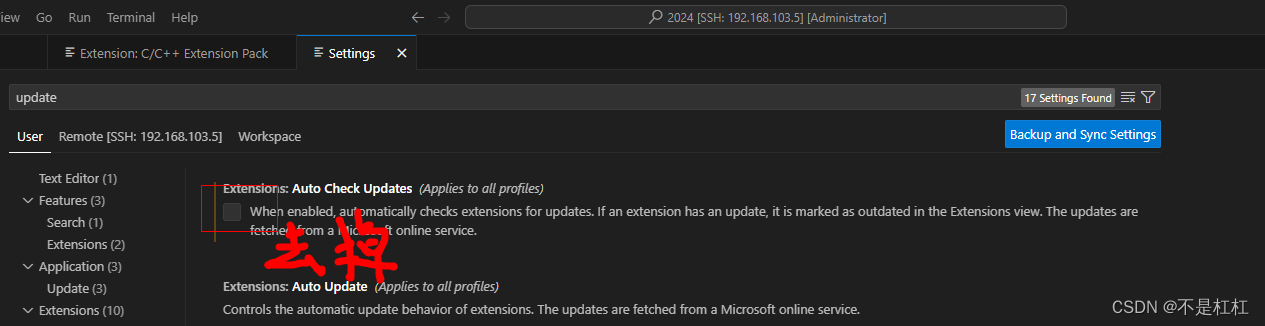
- On desktop, you can download the VS Code release 1.85 from here. Depending on your platform, make sure to disable updates to stay on that version. A good recommendation is to have release 1.85 as a separate installation, set up with Portable Mode. That way, you won't affect your main desktop VS Code version.
- On web, you can add the following query argument ?vscode-version=0ee08df0cf4527e40edc9aa28f4b5bd38bbff2b2 to use VS Code release 1.85.
翻译:
我可以使用较旧的 Linux 发行版运行 VS Code Server 吗?
从 VS Code 1.86 版本开始,远程服务器的构建工具链的最低要求有所提高。VS Code 分布式预构建的服务器与基于 glibc 2.28 或更高版本的 Linux 发行版兼容,例如 Debian 10、RHEL 8、Ubuntu 20.04。
如果您的设置不符合这些要求,并且无法升级 Linux 发行版,您可以降级 VS Code 客户端到 1.85 版本,以继续使用 Remote Development。您可以在桌面和 Web 上降级 VS Code 客户端:
在桌面方面,您可以从这里下载 VS Code 1.85 版本。根据您的平台,请确保禁用更新以保持在该版本。一个好的建议是使 1.85 版本作为单独的安装,并设置便携模式。这样,您不会影响您的主要桌面 VS Code 版本。
在 Web 上,您可以添加以下查询参数 ?vscode-version=0ee08df0cf4527e40edc9aa28f4b5bd38bbff2b2 以使用 VS Code 1.85 版本。
结论
2024 发布的版本1.86连接有问题,需要将vs版本回退到1.85
验证
降版本回退到1.85 连接正常,并且关闭vscode的自动更新选项