

SpringBoot优点达项目实战:登录功能实现(四)
创始人
2025-01-16 07:34:00
0次
SpringBoot优点达项目实战:登录功能实现(四)
文章目录
- SpringBoot优点达项目实战:登录功能实现(四)
- 1、查看接口
- 2、查看数据库
- 3、代码实现
- 1、创建实体类
- 2、controller实现
- 3、service层实现
- 4、Mapper层
- 4、测试
1、查看接口
POST /index/login
Body 请求参数
{ "login_name": "admin", "password": "111111" } 请求参数
| 名称 | 位置 | 类型 | 必选 | 说明 |
|---|---|---|---|---|
| x-token | header | string | true | token字符串 |
| body | body | object | false | none |
| » login_name | body | string | true | 可用 admin |
| » password | body | string | true | 可用 111111 |
返回示例
{ "errno": 0, "errmsg": null,, "data": { "token": "eyJhbGciOiJIUzUxMiJ9.eyJleHAiOjE2NjgwMDYwMTgsInJvbGRJZCI6IltcIjFjNTRlMDAzYzFmYzRkY2Q5YjA4N2VmOGQ0OGFiYWMzXCJdIiwidXNlcklkIjoiMSJ9.mi50Gskw6sV1H-3RPKasO9f_zFw-PgE0VGItvtxxGE1bO9iXer-48i8OCZZtUsJKohX1u0a2r6eFR5e6wRWT8Q" } } 返回结果
| 名称 | 类型 | 必须 | 说明 |
|---|---|---|---|
| »errno | Integer | true | 编码: 0成功,1失败 |
| »errmsg | String | true | 消息 |
| »data | Object | true | 响应数据 |
| »»»token | String | false | 登录成功后的唯一标识 |
2、查看数据库

从password字段可以看出来,密码是进行加密的
3、代码实现
1、创建实体类
@Data @TableName("sys_user") public class SystemUser { @Schema(description = "用户id") @TableId(value = "id") private String id; @Schema(description = "登录账号") @TableField(value = "login_name") @JsonProperty("login_name") private String loginName; @Schema(description = "用户密码") @TableField(value = "password") private String password; @Schema(description = "用户名称") @TableField(value = "name") private String name; @Schema(description = "邮箱") @TableField("email") private String email; @Schema(description = "手机") @TableField(value = "phone") private String phone; @Schema(description = "登录时间") @TableField(value = "login_date") private Date loginDate; @Schema(description = "创建时间") @TableField(value = "create_date",fill = FieldFill.INSERT) @JsonIgnore private Date createDate; @Schema(description = "修改时间") @TableField(value = "update_date",fill = FieldFill.UPDATE) @JsonIgnore private Date updateDate; @Schema(description = "逻辑删除") @TableLogic() @TableField("del_flag") @JsonIgnore private Integer delFlag; @Schema(description = "职位id") @TableField(value = "role_id") private String roleId; @Schema(description = "状态") @TableField(value = "status") private BaseStatus status; @Schema(description = "默认数据") @TableField(value = "default_data") private String defaultData; } - @Data:这是 Lombok 提供的注解,用于自动生成该类的 getter、setter、toString、equals 和 hashCode 方法。
- @TableName(“sys_user”):这是 MyBatis-Plus 提供的注解,用于指定该类对应的数据库表名
sys_user。 - @Schema:用于生成 API 文档时描述字段。
- @TableId 和 @TableField:用于指定数据库表中的列名和属性。
- @JsonProperty 和 @JsonIgnore:用于控制 JSON 序列化和反序列化行为。
- @TableLogic:用于实现逻辑删除
2、controller实现
@PostMapping("/login") @Operation(summary = "后台登录") public String login(@RequestBody SystemUser systemUser){ log.info("用户登录{}",systemUser); String result = systemConfigService.login(systemUser); return result; } - 接收客户端发送的 POST 请求,路径为
/login。 - 将请求体中的 JSON 数据反序列化为
SystemUser对象。 - 记录登录信息到日志中。
- 调用
systemConfigService的login方法进行登录逻辑处理。 - 返回登录结果
3、service层实现
service接口
定义操作SysUser的service
/** * 针对system_user表的用户操作 */ public interface SystemUserService extends IService { } 定义操作SysUser的serviceImpl
@Service @Slf4j public class SystemUserServiceImpl extends ServiceImpl implements SystemUserService { } 在SysconfigService中获取
/** * 用户等登录 * @param systemUser * @return */ String login(SystemUser systemUser); 在实现类中进行业务处理
@Autowired private SystemUserService userService; /** * 用户登录 * * @param systemUser * @return */ @Override public String login(SystemUser systemUser) { String name = systemUser.getLoginName(); String password = systemUser.getPassword(); //判断用户是否输入账号 if (name == null){ throw new youdiandaException(ResultCodeEnum.ADMIN_LOGIN_USER_NULL); } //判断用户是否输入密码 if (password == null){ throw new youdiandaException(ResultCodeEnum.ADMIN_LOGIN_PASSWORD_NULL); } //查询用户 LambdaQueryWrapper queryWrapper = new LambdaQueryWrapper<>(); queryWrapper.eq(SystemUser::getLoginName,name); SystemUser user = userService.getOne(queryWrapper); if (user == null){ throw new youdiandaException(ResultCodeEnum.ADMIN_ACCOUNT_NOT_EXIST_ERROR); } //查询用户是否可用 if (user.getStatus() == BaseStatus.DISABLE){ throw new youdiandaException(ResultCodeEnum.ADMIN_ACCOUNT_DISABLED_ERROR); } //查看密码是否正确 if (!user.getPassword().equals(DigestUtils.md5Hex(password))){ log.info(DigestUtils.md5Hex(user.getPassword())); throw new youdiandaException(ResultCodeEnum.ADMIN_ACCOUNT_ERROR); } // 生成 JWT String token = JwtUtil.createToken(Long.valueOf(user.getId()), user.getName()); // 构建响应数据 Map data = new HashMap<>(); data.put("token", token); Map response = new HashMap<>(); response.put("errno", 0); response.put("errmsg", null); response.put("data", data); try { // 将响应数据转换为 JSON 字符串 ObjectMapper objectMapper = new ObjectMapper(); return objectMapper.writeValueAsString(response); } catch (Exception e) { e.printStackTrace(); return "{\"errno\": 1, \"errmsg\": \"Error generating token\"}"; } } 这个 login 方法实现了用户登录的完整逻辑:
- 验证用户输入的登录名和密码。
- 查询用户是否存在。
- 检查用户状态是否可用。
- 验证用户密码是否正确。
- 生成 JWT 令牌。
- 构建并返回包含令牌的 JSON 响应。
生成JWT令牌
在common模块中定义工具类,进行令牌生成
public class JwtUtil { private static SecretKey secretKey = Keys.hmacShaKeyFor("WyjcDMViPOOsizAdpbrgtbhSXxZBYfns".getBytes()); public static String createToken(Long userId,String username){ String jwt = Jwts.builder() .setExpiration(new Date(System.currentTimeMillis() + 36000000)) .setSubject("LOGIN_USER") .claim("userId", userId) .claim("username", username) .signWith(secretKey, SignatureAlgorithm.HS256) .compact(); return jwt; } } JwtUtil 用于生成 JSON Web Token (JWT),主要包含一个静态方法 createToken,该方法接收用户 ID 和用户名,并生成一个包含这些信息的 JWT。
- secretKey:这是一个静态的
SecretKey对象,用于签署 JWT。它是使用Keys.hmacShaKeyFor方法生成的,参数是一个字节数组,这里是字符串"WyjcDMViPOOsizAdpbrgtbhSXxZBYfns"的字节表示。 - setExpiration:设置 JWT 的过期时间,这里设置为当前时间加上 10 小时(36000000 毫秒)。
- setSubject:设置 JWT 的主题,这里设置为
"LOGIN_USER"。 - claim:添加自定义声明(claims),这里添加了用户 ID (
userId) 和用户名 (username)。 - signWith:使用指定的
secretKey和签名算法(HS256)对 JWT 进行签名。 - compact:生成并返回 JWT 字符串。
业务处理中用到了一些异常,在此之前应该定义异常类
在common模块中定义
@Data public class youdiandaException extends RuntimeException{ //异常状态码 private Integer code; public youdiandaException(String message,Integer code){ super(message); this.code = code; } /** * 根据响应结果枚举对象创建异常对象 */ public youdiandaException(ResultCodeEnum resultCodeEnum){ super(resultCodeEnum.getMessage()); this.code = resultCodeEnum.getCode(); } } 同时在model模块中创建枚举类统一返回的信息
/** * 统一返回结果状态信息类 */ @Getter public enum ResultCodeEnum { LOGIN_SUCCESS(0,"登录成功"), LOGIN_FAIL(1,"登录失败"), SUCCESS(200, "成功"), FAIL(201, "失败"), PARAM_ERROR(202, "参数不正确"), SERVICE_ERROR(203, "服务异常"), DATA_ERROR(204, "数据异常"), ILLEGAL_REQUEST(205, "非法请求"), REPEAT_SUBMIT(206, "重复提交"), ADMIN_LOGIN_AUTH(305, "未登陆"), ADMIN_ACCOUNT_NOT_EXIST_ERROR(306, "账号不存在"), ADMIN_ACCOUNT_ERROR(307, "用户名或密码错误"), ADMIN_ACCOUNT_DISABLED_ERROR(308, "该用户已被禁用"), ADMIN_ACCESS_FORBIDDEN(309, "无访问权限"), ADMIN_LOGIN_USER_NULL(310,"请输入用户"), ADMIN_LOGIN_PASSWORD_NULL(311,"请输入密码"), TOKEN_EXPIRED(601, "token过期"), TOKEN_INVALID(602, "token非法"); private final Integer code; private final String message; ResultCodeEnum(Integer code, String message) { this.code = code; this.message = message; } } 4、Mapper层
@Mapper public interface SystemUserMapper extends BaseMapper { } 因为业务层中使用的是mybatisPlus自带的查询语句,所以Mapper层不需要去进行sql自定义查询,但必须将创建出来,为业务层实现
4、测试
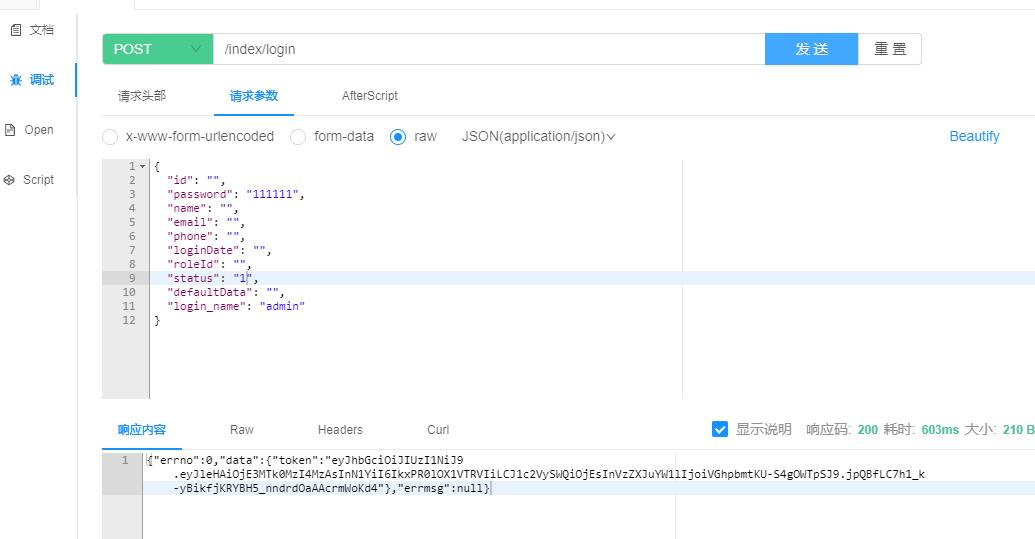
在knife4j进行调试
上一篇:【Chrome开发者工具概览】
下一篇:反向沙箱技术:安全隔离上网
相关内容
热门资讯
实操分享开挂脚本!德扑圈多功能...
实操分享开挂脚本!德扑圈多功能开挂脚本,德扑圈好像存在有开挂脚本1、打开软件启动之后找到中间准星的标...
如何分辨真伪透视器工具!WeP...
如何分辨真伪透视器工具!WePoKer多功能透视器工具,WePoKer切实是真的有透视器工具1、下载...
一分钟揭秘作弊器脚本!红龙po...
一分钟揭秘作弊器脚本!红龙poker多功能作弊器脚本,红龙poker一直真的是有作弊器脚本1、实时红...
一起来讨论作弊器脚本!德扑之星...
一起来讨论作弊器脚本!德扑之星多功能作弊器脚本,德扑之星本来有作弊器脚本德扑之星破解侠是真的助透视。...
免费测试版外挂软件!WPK多功...
免费测试版外挂软件!WPK多功能外挂软件,WPK好像有外挂软件1、金币登录送、破产送、升级送、活动送...
分享开挂内幕作弊器插件!德普之...
分享开挂内幕作弊器插件!德普之星多功能作弊器插件,德普之星一直真的是有作弊器插件1、德普之星公共底牌...
总算了解开挂教程!德扑之星多功...
总算了解开挂教程!德扑之星多功能开挂教程,德扑之星确实存在有开挂教程1、超多福利:超高返利,海量正版...
实测揭晓辅助技巧!智星德州扑克...
实测揭晓辅助技巧!智星德州扑克多功能辅助技巧,智星德州扑克本来真的有辅助技巧1、智星德州扑克模拟器是...
玩家必看科普辅助教程!wpk多...
玩家必看科普辅助教程!wpk多功能辅助教程,wpk都是是真的有辅助教程1、操作简单,无需wpk手机版...
玩家必看科普透视挂app!AA...
玩家必看科普透视挂app!AAPoKer多功能透视挂app,AAPoKer一贯真的是有透视挂appA...