

GeoJson和WKT数据格式解析
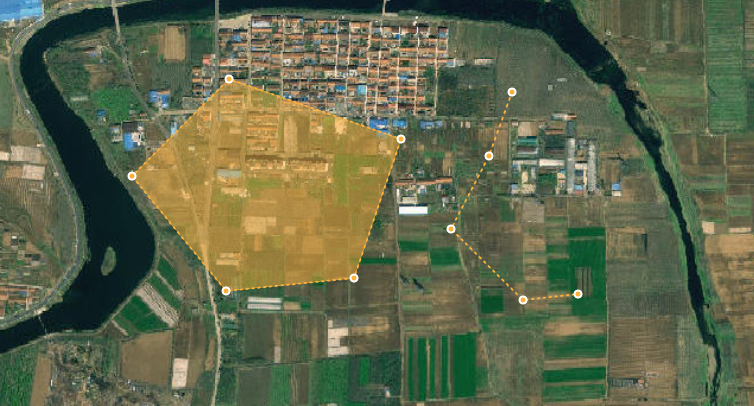
1. GeoJson数据格式
GEOJSON是gis地图中常用的数据格式,制作地图时用于存储各种地理数据,使用时通过OpenLayer、Leaflet、mapLibre-gl或者Cesium加载GEOJSON即可渲染出GEOJSON中描述的地理要素。 GeoJSON是一种对各种地理数据结构进行编码的格式,基于Javascript对象表示法(JavaScript Object Notation, 简称JSON)的地理空间信息数据交换格式。GeoJSON对象可以表示几何、特征或者特征集合。GeoJSON支持下面这几种几何类型:点、线、面、多点、多线、多面和几何集合。GeoJSON里的特征包含一个几何对象和其他属性,特征集合表示一系列特征。
1.1 GeoJson格式Point(点)数据类型
// 单点 { "type": "Feature", "geometry": { "type": "Point", "coordinates": [117.99190687, 35.50822557] }, "properties": { "id": 1, } } // 点集合 { "type": "FeatureCollection", "features": [ { "type": "Feature", "geometry": { "type": "Point", "coordinates": [117.99190687, 35.50822557] }, "properties": { "id": 1, } }, { "type": "Feature", "geometry": { "type": "Point", "coordinates": [117.96619434, 35.52166714] }, "properties": { "id": 2, } }, { "type": "Feature", "geometry": { "type": "Point", "coordinates": [117.97335273, 35.48674373] }, "properties": { "id": 3, } } ], }1.2 LineString(单线集合)
{ "type": "FeatureCollection", "features": [ { "type": "Feature", "geometry": { "type": "LineString", "coordinates": [ [118.0306694, 35.43721579], [118.03078743, 35.43724285], [118.03111693, 35.43731908], [118.0311978, 35.43734919], [118.03221024, 35.43769322], [118.03250704, 35.43812874] ] }, "properties": { "id": 1, } }, { "type": "Feature", "geometry": { "type": "LineString", "coordinates": [ [118.07791132, 35.47249553], [118.07756802, 35.47253279], [118.07724543, 35.47267541], [118.07695463, 35.47279278], [118.07664908, 35.47296262], [118.07639818, 35.47313537], [118.07625144, 35.47323399], ] }, "properties": { "id": 2, } } ] }1.3 MultiLineString(多线集合)
{ "type": "FeatureCollection", "features": [ { "type": "Feature", "geometry": { "type": "MultiLineString", "coordinates": [ [ [118.0306694, 35.43721579], [118.03078743, 35.43724285], [118.03111693, 35.43731908], [118.0311978, 35.43734919], [118.03221024, 35.43769322], [118.03250704, 35.43812874] ] ] }, "properties": { "id": 1, } }, { "type": "Feature", "geometry": { "type": "MultiLineString", "coordinates": [ [ [118.07791132, 35.47249553], [118.07756802, 35.47253279], [118.07724543, 35.47267541], [118.07695463, 35.47279278], [118.07664908, 35.47296262], [118.07639818, 35.47313537], [118.07625144, 35.47323399], ] ] }, "properties": { "id": 2, } } ] }注意:LineString和MultiLineString区别是geometry中coordinates中数组层数,在LineString中coordinates比MultiLineString中coordinates数组少一层。
1.4 Polygon(单面集合)
{ "type": "FeatureCollection", "features": [ { "type": "Feature", "geometry": { "type": "Polygon", "coordinates": [ [ [118.0311135, 35.41468743], [118.03107835, 35.41461441], [118.03105841, 35.41461084], [118.03102488, 35.41462013], [118.03092181, 35.41466966], [118.0311135, 35.41468743] ] ] }, "properties": { "id": 1, } }, { "type": "Feature", "geometry": { "type": "Polygon", "coordinates": [ [ [118.02874987, 35.41063291], [118.02873699, 35.41060668], [118.02834078, 35.41083566], [118.02820339, 35.41091506], [118.02798847, 35.41104033], [118.02795153, 35.41105555], [118.02874987, 35.41063291] ] ] }, "properties": { "id": 2, } } ] }1.5 MultiPolygon(多面集合)
{ "type": "FeatureCollection", "features": [ { "type": "Feature", "geometry": { "type": "MultiPolygon", "coordinates": [ [ [ [118.0311135, 35.41468743], [118.03107835, 35.41461441], [118.03105841, 35.41461084], [118.03102488, 35.41462013], [118.03092181, 35.41466966], [118.0311135, 35.41468743] ] ] ] }, "properties": { "id": 1, } }, { "type": "Feature", "geometry": { "type": "MultiPolygon", "coordinates": [ [ [ [118.02874987, 35.41063291], [118.02873699, 35.41060668], [118.02834078, 35.41083566], [118.02820339, 35.41091506], [118.02798847, 35.41104033], [118.02795153, 35.41105555], [118.02792176, 35.41106236], [118.02788682, 35.41106302], [118.02788728, 35.41106386], [118.02792627, 35.41113385], [118.02793955, 35.41115771], [118.02874987, 35.41063291] ] ] ] }, "properties": { "id": 2, } } ] }注意:Polygon和MultiPolygon区别是geometry中coordinates中数组层数,在Polygon中coordinates比MultiPolygon中coordinates数组少一层。
2. WKT数据格式
WKT(Well-Known Text)是一种文本标记语言,用于表示矢量几何对象、空间参照系统及其转换。它使得这些复杂的空间几何数据能够以可读的文本形式被表示和传输,广泛应用于各种地理信息系统(GIS)软件和空间数据库中。WKT可以表示的几何对象包括点、线、多边形、TIN(不规则三角网)及多面体等。几何物体的坐标可以是2D(x,y)、3D(x,y,z)、4D(x,y,z,m),加上一个属于线性参照系统的m值。
2.1 POINT和MULTIPOINT数据格式
POINT (117.844905 35.587575)POINT (117.844905 35.587575,117.844905 35.587575)2.2 LINESTRING和MULTILINESTRING数据格式
LINESTRING (117.95478812043194 35.50016111366496, 117.95423677717844 35.50575352325713, 117.9540469028758 35.50575206646059, 117.95368528617945 35.50606837012798, 117.95301975665973 35.50627372821367, 117.95262234282126 35.50603399077764, 117.93590540697693 35.546293779632094)MULTILINESTRING ((117.95478812043194 35.50016111366496, 117.95423677717844 35.50575352325713, 117.9540469028758 35.50575206646059, 117.95368528617945 35.50606837012798, 117.95301975665973 35.50627372821367, 117.95262234282126 35.50603399077764, 117.93590540697693 35.546293779632094),(117.9329513143731 35.4632993559314, 117.93296168369284 35.46347847443357, 117.93309224270592 35.4646118095705, 117.93324857080336 35.46475406666043, 117.93328488319906 35.46498017533969, 117.93362818736597 35.46502470168066, 117.93361807425754 35.465040983674))2.3 POLYGON和MULTIPOLYGON数据格式
POLYGON ((118.11815652442374 35.42505815206363, 118.11809941735964 35.424981414446336, 118.11800364405428 35.42502900366634, 118.11805653677436 35.42510932391832, 118.11815652442374 35.42505815206363))MULTIPOLYGON (((118.11815652442374 35.42505815206363, 118.11809941735964 35.424981414446336, 118.11800364405428 35.42502900366634, 118.11805653677436 35.42510932391832, 118.11815652442374 35.42505815206363)))3.GeoJSON数据和WKT数据格式转换
WKT数据格式通常是后端能够处理得到的数据格式,前端地图框架通用空间数据格式为GeoJSON,因此前端需要将WKT转换为GeoJSON格式才能被利用。前端可以使用terraformer-wkt-parser插件实现WKT数据和GeoJSON数据之间的转换,
插件的NPM地址:terraformer-wkt-parser - npm
3.1 terraformer-wkt-parser插件安装
npm install terraformer-wkt-parser3.2 WKT与GeoJson数据转换
import WKT from "terraformer-wkt-parser" // parse() 将wkt转为geojson const WktToGeojson = (wktData)=> { return WKT.parse(wktData) } // convert() 将geojson转为wkt const GeojsonToWkt = (geojsonData)=> { return WKT.convert(geojsonData) } export {WktToGeojson,GeojsonToWkt}注意:parse()方法和convert()方法返回和传入的geojson都是单几何图形,不能是几何图形集合。