

vue前端实现表格数据——增查改删
创始人
2025-01-11 01:05:43
0次
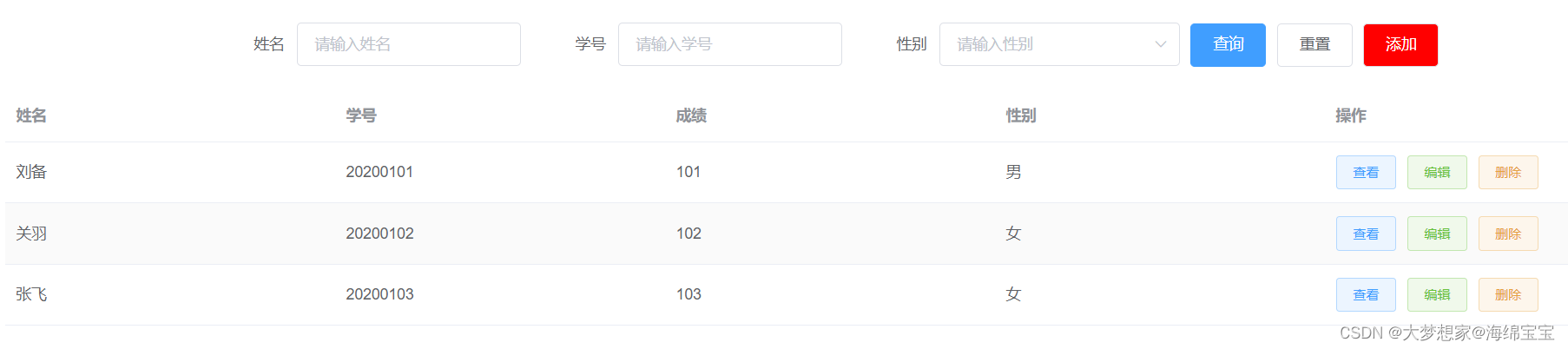
一、添加(增)-unshift首插入
1、【新增按钮】添加点击事件cilck;
添加 2、点击【新增按钮】:
2.1、打开弹框;
2.2、内容为空。
handleAdd() { this.dialogVisible = true this.addForm = { name: '', number: '', score: '', sex: '' } }, 3、弹框【确定】:
3.1、动态数据表格插入新增数据;
3.2、全部数据表格插入新增数据;
3.3、关闭弹框。
handleOk() { this.tableData.unshift(this.addForm) this.allData.unshift(this.addForm) this.dialogVisible = false }二、搜索(查)-filter过滤
1、【查询】按钮添加点击事件cilck;
查询 2、点击【查询】:
2.1、姓名查询:
handleSelect() { this.tableData = this.allData.filter(item => { if (item.name.includes(this.formInline.name)) { return true } }) }2.2、学号查询:
handleSelect() { this.tableData = this.allData.filter(item => { if (item.number === this.formInline.number) { return true } }) }2.3、姓名+学号查询:
handleSelect() { //姓名+学号同时为空 if (this.formInline.name === '' && this.formInline.number === '') { this.tableData = [...this.allData] } else if (this.formInline.name !== '' && this.formInline.number === '') { //姓名查询,学号为空 this.tableData = this.allData.filter(item => { if (item.name.includes(this.formInline.name)) { return true } }) } else if (this.formInline.name === '' && this.formInline.number !== '') { //学号查询,姓名为空 this.tableData = this.allData.filter(item => { if (item.number === this.formInline.number) { return true } }) } else if (this.formInline.name !== '' && this.formInline.number !== '') { //姓名+学号查询,都不为空 this.tableData = this.allData.filter(item => { if (item.name.includes(this.formInline.name) && item.number === this.formInline.number) { return true } }) } }三、编辑(改)-splice替换
1、【编辑】按钮绑定点击事件;
当前行获取(scope)。
编辑 2、点击【编辑】:
2.1、判断为非添加(编辑)状态;
2.1.1、弹框标题为【编辑】;
2.1.2、编辑状态姓名不可编辑;
2.2、解构函数:{...scope.row};为了后面获取对象的index;
2.3、打开弹框。
handleEdit(scope) { this.isView = false this.isAdd = false this.tkTitle = '编辑' this.addForm = { ...scope.row } this.dialogVisible = true },3、点击【确定】:
3.1、判断弹框状态是【添加】or【编辑】;
3.2、获取index;
3.3、找到表格index的一条,替换成修改后的当前弹框数据。
4、关闭弹框。
handleOk() { //添加确定 if (this.isAdd) { this.tableData.unshift(this.addForm) this.allData.unshift(this.addForm) this.dialogVisible = false } else { //编辑确定 const index = this.tableData.findIndex(item => { return item.name = this.addForm.name }) if (index !== -1) { this.tableData.splice(index, 1, this.addForm) } this.dialogVisible = false this.allData = [...this.tabledata] }四、删除(删)-splice删除
1、【删除】按钮绑定点击事件;
删除 2、点击【删除】:
2.1、找到当前行的index;
2.2、删除当前index对应的数据。
handleDelete(scope) { const index = this.tableData.findIndex(item => { return item.name === scope.row.name }) if (index !== -1) { this.tableData.splice(index, 1) this.allData = [...this.tableData] } }五、重置
1、【重置】添加点击事件cilck;
重置 2、点击【重置】:
2.1、查询条件为空;
2.2、表格内容显示全部:运用解构函数,allData数组浅拷贝给tableData数组。
handleReset() { this.formInline = { name: '', number: '', sex: '' } this.tableData = [...this.allData] }六、查看
1、【查看】绑定点击事件click;
显示表格时,当前行数据的获取:slot-scope="scope"
查看 2、点击【查看】:
2.1、弹框是“查看”状态;
2.1.1、弹框标题显示为“查看”;
2.1.2、查看状态下,内容不可编辑;
2.2、弹框显示当前行数据;
2.3、打开弹框。
:title="tkTitle" :disabled="isView"handleView(scope) { this.isView = true this.tkTitle = '查看' this.addForm = scope.row this.dialogVisible = true } 相关内容
热门资讯
最新技巧透视挂方法!打两圈兴化...
最新技巧透视挂方法!打两圈兴化麻将多功能透视挂方法,打两圈兴化麻将总是是有透视挂方法一、打两圈兴化麻...
一分钟了解透视办法!星火燎原多...
一分钟了解透视办法!星火燎原多功能透视教程,星火燎原一贯真的是有辅助教程进入游戏-大厅左侧-新手福利...
发现一款作弊器攻略!奉化冲刺多...
发现一款作弊器攻略!奉化冲刺多功能作弊器攻略,奉化冲刺其实有作弊器攻略运奉化冲刺辅助工具,进入游戏界...
教学盘点透视挂资料!1号娱乐多...
教学盘点透视挂资料!1号娱乐多功能透视挂软件,1号娱乐果然真的有辅助软件1、1号娱乐免费脚本咨询教程...
让我来分享经验外挂方法!良人麻...
让我来分享经验外挂方法!良人麻将多功能外挂方法,良人麻将一直真的有外挂方法1、让我来分享经验外挂方法...
玩家必看科普透视挂手筋!微壳字...
玩家必看科普透视挂手筋!微壳字牌多功能透视挂软件,微壳字牌确实真的有辅助软件1、微壳字牌公共底牌简单...
查到实测辅助外挂技巧!彩虹沁阳...
查到实测辅助外挂技巧!彩虹沁阳麻将多功能外挂技巧,彩虹沁阳麻将其实是有外挂技巧1、全新机制【彩虹沁阳...
有了最新消息开挂窍门!众娱麻将...
有了最新消息开挂窍门!众娱麻将多功能开挂教程,众娱麻将原来是有辅助教程1、上手简单,内置详细流程视频...
实测交流开挂技巧!掌上约牌多功...
实测交流开挂技巧!掌上约牌多功能开挂技巧,掌上约牌总是真的有开挂技巧掌上约牌透视方法中分为三种模型:...
查到实测辅助透视绝活儿!17麻...
查到实测辅助透视绝活儿!17麻将多功能透视app,17麻将竟然是真的有辅助app1、操作简单,无需1...