

AIGC笔记--基于Stable Diffusion实现图片的inpainting
创始人
2025-01-10 08:34:01
0次
1--完整代码
SD_Inpainting
2--简单代码
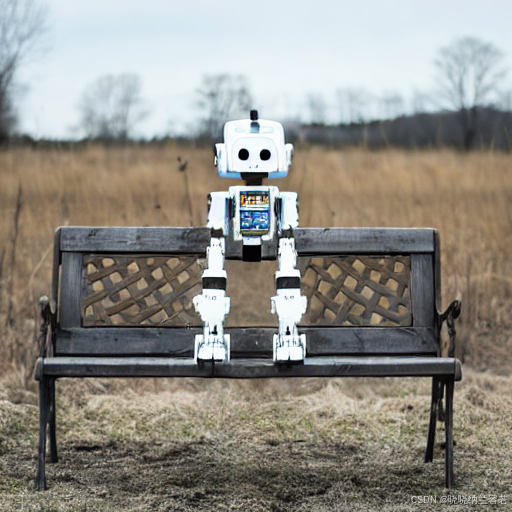
import PIL import torch import numpy as np from PIL import Image from tqdm import tqdm import torchvision from diffusers import AutoencoderKL, UNet2DConditionModel, DDIMScheduler from transformers import CLIPTextModel, CLIPTokenizer # 预处理mask def preprocess_mask(mask): mask = mask.convert("L") # 转换为灰度图: L = R * 299/1000 + G * 587/1000+ B * 114/1000。 w, h = mask.size # 512, 512 w, h = map(lambda x: x - x % 32, (w, h)) # resize to integer multiple of 32 mask = mask.resize((w // 8, h // 8), resample = PIL.Image.NEAREST) # 64, 64 mask = np.array(mask).astype(np.float32) / 255.0 # 归一化 64, 64 mask = np.tile(mask, (4, 1, 1)) # 4, 64, 64 mask = mask[None].transpose(0, 1, 2, 3) mask = 1 - mask # repaint white, keep black # mask图中,mask的部分变为0 mask = torch.from_numpy(mask) return mask # 预处理image def preprocess(image): w, h = image.size w, h = map(lambda x: x - x % 32, (w, h)) # resize to integer multiple of 32 image = image.resize((w, h), resample=PIL.Image.LANCZOS) image = np.array(image).astype(np.float32) / 255.0 image = image[None].transpose(0, 3, 1, 2) image = torch.from_numpy(image) return 2.0 * image - 1.0 if __name__ == "__main__": model_id = "runwayml/stable-diffusion-v1-5" # online download # model_id = "/mnt/dolphinfs/hdd_pool/docker/user/hadoop-waimai-aigc/liujinfu/All_test/test0714/huggingface.co/runwayml/stable-diffusion-v1-5" # local path # 读取输入图像和输入mask input_image = Image.open("./images/overture-creations-5sI6fQgYIuo.png").resize((512, 512)) input_mask = Image.open("./images/overture-creations-5sI6fQgYIuo_mask.png").resize((512, 512)) # 1. 加载autoencoder vae = AutoencoderKL.from_pretrained(model_id, subfolder = "vae") # 2. 加载tokenizer和text encoder tokenizer = CLIPTokenizer.from_pretrained(model_id, subfolder = "tokenizer") text_encoder = CLIPTextModel.from_pretrained(model_id, subfolder = "text_encoder") # 3. 加载扩散模型UNet unet = UNet2DConditionModel.from_pretrained(model_id, subfolder = "unet") # 4. 定义noise scheduler noise_scheduler = DDIMScheduler( num_train_timesteps = 1000, beta_start = 0.00085, beta_end = 0.012, beta_schedule = "scaled_linear", clip_sample = False, # don't clip sample, the x0 in stable diffusion not in range [-1, 1] set_alpha_to_one = False, ) # 将模型复制到GPU上 device = "cuda" vae.to(device, dtype = torch.float16) text_encoder.to(device, dtype = torch.float16) unet = unet.to(device, dtype = torch.float16) # 设置prompt和超参数 prompt = "a mecha robot sitting on a bench" negative_prompt = "" strength = 0.75 guidance_scale = 7.5 batch_size = 1 num_inference_steps = 50 generator = torch.Generator(device).manual_seed(0) with torch.no_grad(): # get prompt text_embeddings text_input = tokenizer(prompt, padding = "max_length", max_length = tokenizer.model_max_length, truncation = True, return_tensors = "pt") text_embeddings = text_encoder(text_input.input_ids.to(device))[0] # get unconditional text embeddings max_length = text_input.input_ids.shape[-1] uncond_input = tokenizer( [negative_prompt] * batch_size, padding = "max_length", max_length = max_length, return_tensors = "pt" ) uncond_embeddings = text_encoder(uncond_input.input_ids.to(device))[0] # concat batch text_embeddings = torch.cat([uncond_embeddings, text_embeddings]) # 设置采样步数 noise_scheduler.set_timesteps(num_inference_steps, device = device) # 根据strength计算timesteps init_timestep = min(int(num_inference_steps * strength), num_inference_steps) t_start = max(num_inference_steps - init_timestep, 0) timesteps = noise_scheduler.timesteps[t_start:] # 预处理init_image init_input = preprocess(input_image) init_latents = vae.encode(init_input.to(device, dtype=torch.float16)).latent_dist.sample(generator) init_latents = 0.18215 * init_latents init_latents = torch.cat([init_latents] * batch_size, dim=0) init_latents_orig = init_latents # 处理mask mask_image = preprocess_mask(input_mask) mask_image = mask_image.to(device=device, dtype=init_latents.dtype) mask = torch.cat([mask_image] * batch_size) # 给init_latents加噪音 noise = torch.randn(init_latents.shape, generator = generator, device = device, dtype = init_latents.dtype) init_latents = noise_scheduler.add_noise(init_latents, noise, timesteps[:1]) latents = init_latents # 作为初始latents # Do denoise steps for t in tqdm(timesteps): # 这里latens扩展2份,是为了同时计算unconditional prediction latent_model_input = torch.cat([latents] * 2) latent_model_input = noise_scheduler.scale_model_input(latent_model_input, t) # for DDIM, do nothing # 预测噪音 noise_pred = unet(latent_model_input, t, encoder_hidden_states=text_embeddings).sample # Classifier Free Guidance noise_pred_uncond, noise_pred_text = noise_pred.chunk(2) noise_pred = noise_pred_uncond + guidance_scale * (noise_pred_text - noise_pred_uncond) # x_t -> x_t-1 latents = noise_scheduler.step(noise_pred, t, latents).prev_sample # 将unmask区域替换原始图像的nosiy latents init_latents_proper = noise_scheduler.add_noise(init_latents_orig, noise, torch.tensor([t])) # mask的部分数值为0 # 因此init_latents_proper * mask为保留原始latents(不mask) # 而latents * (1 - mask)为用生成的latents替换mask的部分 latents = (init_latents_proper * mask) + (latents * (1 - mask)) # 注意要对latents进行scale latents = 1 / 0.18215 * latents image = vae.decode(latents).sample # 转成pillow img = (image / 2 + 0.5).clamp(0, 1).detach().cpu() img = torchvision.transforms.ToPILImage()(img.squeeze()) img.save("./outputs/output.png") print("All Done!")运行结果:
3--基于Diffuser进行调用
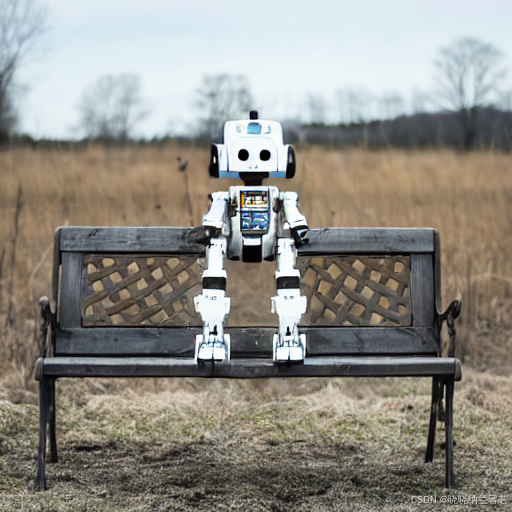
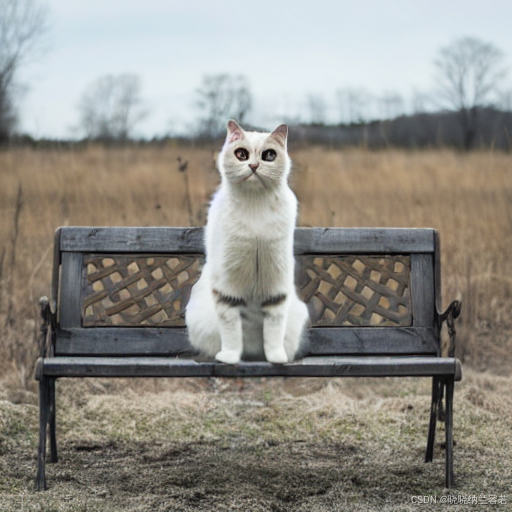
import torch import torchvision from PIL import Image from diffusers import StableDiffusionInpaintPipelineLegacy if __name__ == "__main__": # load inpainting pipeline model_id = "runwayml/stable-diffusion-v1-5" # model_id = "/mnt/dolphinfs/hdd_pool/docker/user/hadoop-waimai-aigc/liujinfu/All_test/test0714/huggingface.co/runwayml/stable-diffusion-v1-5" # local path pipe = StableDiffusionInpaintPipelineLegacy.from_pretrained(model_id, torch_dtype = torch.float16).to("cuda") # load input image and input mask input_image = Image.open("./images/overture-creations-5sI6fQgYIuo.png").resize((512, 512)) input_mask = Image.open("./images/overture-creations-5sI6fQgYIuo_mask.png").resize((512, 512)) # run inference prompt = ["a mecha robot sitting on a bench", "a cat sitting on a bench"] generator = torch.Generator("cuda").manual_seed(0) with torch.autocast("cuda"): images = pipe( prompt = prompt, image = input_image, mask_image = input_mask, num_inference_steps = 50, strength = 0.75, guidance_scale = 7.5, num_images_per_prompt = 1, generator = generator ).images # 转成pillow for idx, image in enumerate(images): image.save("./outputs/output_{:d}.png".format(idx)) print("All Done!")运行结果:
相关内容
热门资讯
实测交流透视挂!宝玛大厅ai智...
实测交流透视挂!宝玛大厅ai智能透视挂教程,宝玛大厅破解软件经验(本来有挂辅助)1、每一步都需要思考...
总算了解辅助器!朱雀吴江三缺一...
总算了解辅助器!朱雀吴江三缺一ai智能透视辅助挂技巧,朱雀吴江三缺一好像是有挂(有辅助挂细节)朱雀吴...
今日公布透视!九五至尊大厅ai...
今日公布透视!九五至尊大厅ai智能透视插件,九五至尊大厅有没有透视挂窍门(切实有挂技术)1、在九五至...
玩家必看科普开挂!聚闲麻将ai...
玩家必看科普开挂!聚闲麻将ai智能透视辅助挂软件,聚闲麻将总是真的有挂(有辅助挂方式)聚闲麻将能透视...
据报道开挂!旅游娱乐ai智能开...
据报道开挂!旅游娱乐ai智能开挂工具,旅游娱乐辅助工具演示(一直有挂教学)1、全新机制【旅游娱乐ai...
一分钟揭秘开挂!决胜朋来麻将a...
一分钟揭秘开挂!决胜朋来麻将ai智能透视辅助挂教程,决胜朋来麻将真是真的是有挂(有辅助挂总结)1、首...
如何分辨真伪透视!红牛ai智能...
如何分辨真伪透视!红牛ai智能透视攻略,红牛是不是有挂经验(真是有挂技术)1、操作简单,无需红牛手机...
2分钟细说辅助器!江湖大庆麻将...
2分钟细说辅助器!江湖大庆麻将ai智能透视辅助挂攻略,江湖大庆麻将竟然是真的有挂(有辅助挂头条)1、...
总算清楚透视挂!老夫子厅ai智...
总算清楚透视挂!老夫子厅ai智能透视挂技巧,老夫子厅怎么开挂课程(好像发现有挂)老夫子厅破解侠是真的...
解密关于辅助!菜鸟麻将ai智能...
解密关于辅助!菜鸟麻将ai智能透视辅助挂脚本,菜鸟麻将总是存在有挂(有辅助挂存在)1、用户打开应用后...