

信号特征之希尔伯特变换(Python、C++、MATLAB实现)
希尔伯特变换
1 特征描述
希尔伯特变换广泛使用于信号处理应用中,以获得信号的解析表示。其可以计算瞬时频率和相位,相位被定义为原始信号和信号的希尔伯特变换之间的角度。对于信号 x ( t ) x(t) x(t),其希尔伯特变换定义如下。
x ^ ( t ) = H [ x ( t ) ] = 1 π ∫ − ∞ + ∞ x ( τ ) t − τ d τ \hat{x}(t)=H[x(t)]=\frac{1}{\pi}\int_{-\infty}^{+\infty}\frac{x(\tau)}{t-\tau}\,\text{d}\tau x^(t)=H[x(t)]=π1∫−∞+∞t−τx(τ)dτ
由上式可知,随着变换的结果,自变量不变,因此输出 x ^ ( t ) \hat{x}(t) x^(t)也是与时间有关的函数。此外, x ^ ( t ) \hat{x}(t) x^(t)是 x ( t ) x(t) x(t)的线性函数。它是由 ( π t ) − 1 {({\pi}t)}^{-1} (πt)−1与 x ( t ) x(t) x(t)卷积获得的,如下关系所示。
x ^ ( t ) = 1 π t ∗ x ( t ) \hat{x}(t)=\frac{1}{{\pi}t}\,\ast\,x(t) x^(t)=πt1∗x(t)
由上式可以得到 x ( t ) x(t) x(t)的希尔伯特变换的傅立叶变换如下所示。
F [ x ^ ( t ) ] = F [ 1 π t ] F [ x ( t ) ] = − j s g n ( f ) F [ x ( t ) ] \begin{split} F[\hat{x}(t)]&=F[\frac{1}{{\pi}t}]F[x(t)] \\ &=-j\,sgn(f)F[x(t)] \end{split} F[x^(t)]=F[πt1]F[x(t)]=−jsgn(f)F[x(t)]
其中, s g n ( f ) sgn(f) sgn(f)如下所示。
s g n ( f ) = { + 1 , f > 0 0 , f = 0 − 1 , f < 0 sgn(f)= \begin{cases} \begin{split} +1,&{\quad}f>0\\ 0,&{\quad}f=0\\ -1,&{\quad}f<0 \end{split} \end{cases} sgn(f)=⎩⎨⎧+1,0,−1,f>0f=0f<0
希尔伯特变换对实际数据作90度相移,正弦变为余弦,反之亦然。希尔伯特变换可用于从实际信号中产生解析信号,解析信号在通信领域中很有用,尤其是在带通信号处理中。解析信号如下所示。
s ( t ) = x ( t ) + j x ^ ( t ) s(t)=x(t)+j\hat{x}(t) s(t)=x(t)+jx^(t)
解析信号的实部是原始的信号数据,虚部是实际的希尔伯特变换结果。
2 数据来源
提供一串信号的数据:
这组数据存在三个频率分量,分别为100Hz,200Hz和300Hz, 用MATLAB生成。
# 定义三个频率分量的参数 t = 0:0.0001:2/100; freq1 = 100; # 第一个频率分量的频率(Hz) freq2 = 200; # 第二个频率分量的频率(Hz) freq3 = 300; # 第三个频率分量的频率(Hz) # 生成三个频率分量的正弦波信号 signal1 = sin(2 * pi * freq1 * t); signal2 = sin(2 * pi * freq2 * t); signal3 = sin(2 * pi * freq3 * t); # 将三个频率分量的信号相加 result = signal1 + signal2 + signal3; 3 函数的Python代码
3.1 Python库要求
from scipy import signal 3.2 hilbert希尔伯特变换函数
其中,inputS为输入的信号序列,函数的返回值outputS为解析信号序列。解析信号的实部是原始的信号数据,虚部是实际的希尔伯特变换结果。
outputS = signal.hilbert(inputS) 3.3 希尔伯特变换函数hilbert验证
from scipy import signal inputS = input().split() outputS = signal.hilbert(inputS) for i in outputS: print("{} ".format(i.imag), end='') 4 函数的C++代码
4.1 C++库要求
#include #include #include #include 4.2 void HilbertTransform(vector &cinS, vector> &outputS)希尔伯特变换函数
其中,cinS为输入的信号序列,outputS为得到的解析信号序列。解析信号的实部是原始的信号数据,虚部是实际的希尔伯特变换结果。
void HilbertTransform(vector &cinS, vector> &outputS) { //flag=-1时为正变换, flag=1时为反变换 auto dft = [](vector> &Data, int flag) { int length = Data.size(); complex wn; vector> temp(length); for (size_t i = 0; i < length; i++) { temp[i] = 0.; for (size_t j = 0; j < length; j++) { wn = complex(cos(2. * acos(-1) / length * i * j), sin(flag * 2. * acos(-1) / length * i * j)); temp[i] = temp[i] + Data[j] * wn; } } if (flag == -1) { Data = temp; } else if (flag == 1) { for (size_t i = 0; i < length; i++) { Data[i] = temp[i] / double(length); } } return; }; int length = cinS.size(); outputS.resize(length); for (size_t i = 0; i < length; i++) { outputS[i].real(cinS[i]); outputS[i].imag(0.); } dft(outputS, -1); //DFT int half = ((length % 2) == 0) ? (length / 2) : ((length + 1) / 2); for (size_t i = half; i < length; i++) { outputS[i] = 0.; } dft(outputS, 1); //IDFT for (size_t i = 0; i < length; i++) { outputS[i] = 2. * outputS[i]; } return; } 4.3 希尔伯特变换函数void HilbertTransform(vector &cinS, vector> &outputS)验证
int main() { double temp; vector cinS; vector> outputS; int cinNum; cin >> cinNum; //201 for (size_t i = 0; i < cinNum; i++) { cin >> temp; cinS.emplace_back(temp); } HilbertTransform(cinS, outputS); cout << endl << endl; for (size_t i = 0; i < cinNum; i++) { cout << imag(outputS[i]) << " "; } return 0; } 5 函数的MATLAB代码
5.1 hilbert希尔伯特变换函数
其中,result为输入的信号序列,函数的返回值HilbertR为解析信号序列。解析信号的实部是原始的信号数据,虚部是实际的希尔伯特变换结果。
HilbertR = hilbert(result); 5.2 希尔伯特变换函数hilbert验证
HilbertR = hilbert(result); plot(t, real(HilbertR)) hold on plot(t, imag(HilbertR)) hold off legend('Real Part','Imaginary Part') 5.3 hilbert希尔伯特变换函数原理解析
MATLAB中的希尔伯特变换并没有直接给出信号的变换结果,而是得到了解析信号。解析信号的实部是原始的信号数据,虚部是实际的希尔伯特变换结果。
事实上,MATLAB是先通过fft得到原始信号的快速傅立叶变换,再将fft后的后半部分信号置零,最后通过ifft得到了解析信号。
5.4 希尔伯特变换函数hilbert原理验证
下面对上述信号处理过程进行验证。
fftR = fft(result); if mod(length(fftR), 2) == 0 half = length(fftR) / 2; else half = (length(fftR) + 1) / 2; end fftR(half + 1:length(fftR)) = 0; ifftfftR = 2 * ifft(fftR); 通过下面的绘制可以发现上述处理过程与直接使用hilbert函数进行希尔伯特变换得到的结果相同。
plot(t, real(HilbertR)) hold on plot(t, real(ifftfftR)) hold off figure plot(t, imag(HilbertR)) hold on plot(t, imag(ifftfftR)) hold off 上文中的C++代码就是根据此处理过程编写的,不过使用的是DFT而非FFT。
6 结果
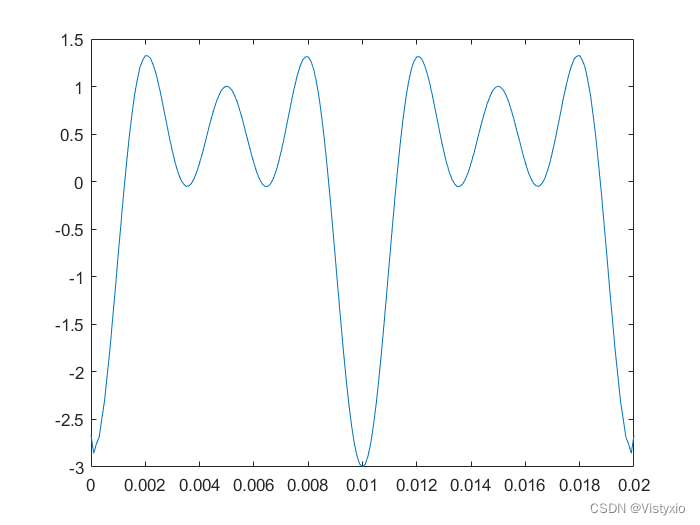
6.1 Python绘制的希尔伯特变换图像
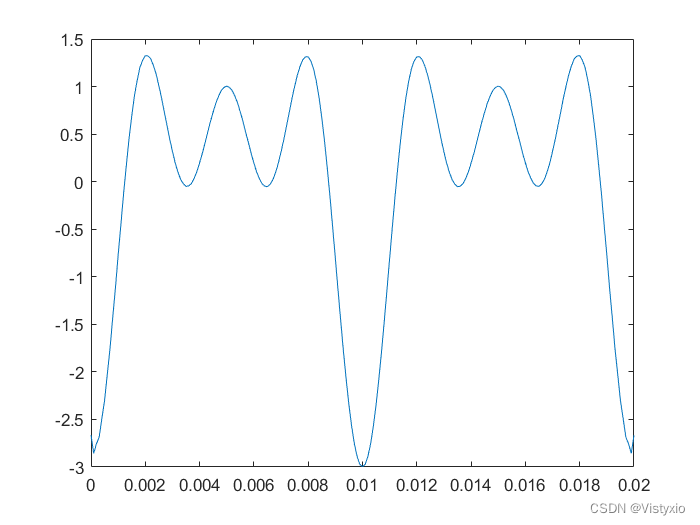
6.2 C++绘制的希尔伯特变换图像
6.3 MATLAB绘制的希尔伯特变换图像
上一篇:python DataFrame数据分组统计groupby()函数
下一篇:华为OD机试统一考试D卷C卷 - 构成指定长度字符串的个数 / 字符串拼接( C++ Java JavaScript python C语言)