

C#绘制阻抗圆图初步
创始人
2024-12-29 10:06:07
0次
阻抗圆图,或者叫史密斯图,是无线电设计方面用的;
基本的阻抗圆图如下,
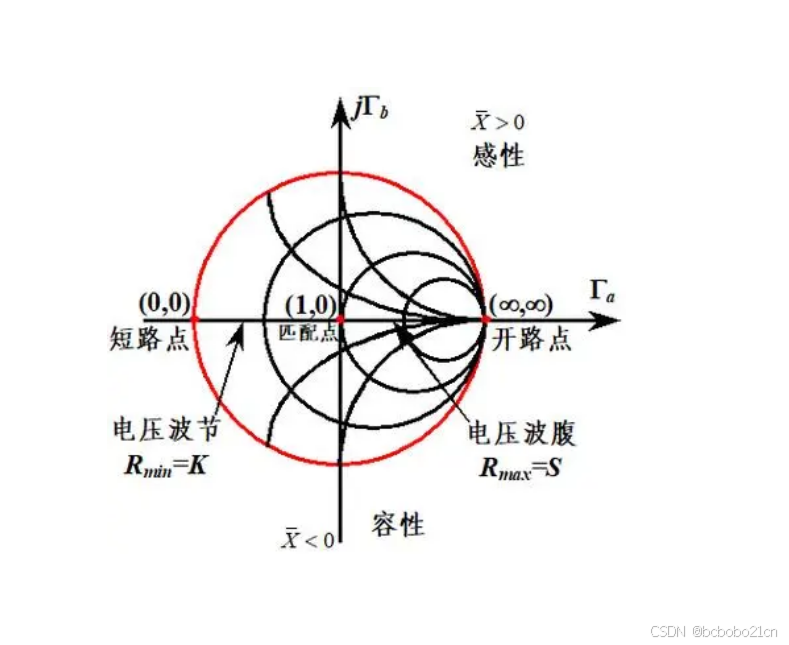
下面尝试用C#能不能画一下;
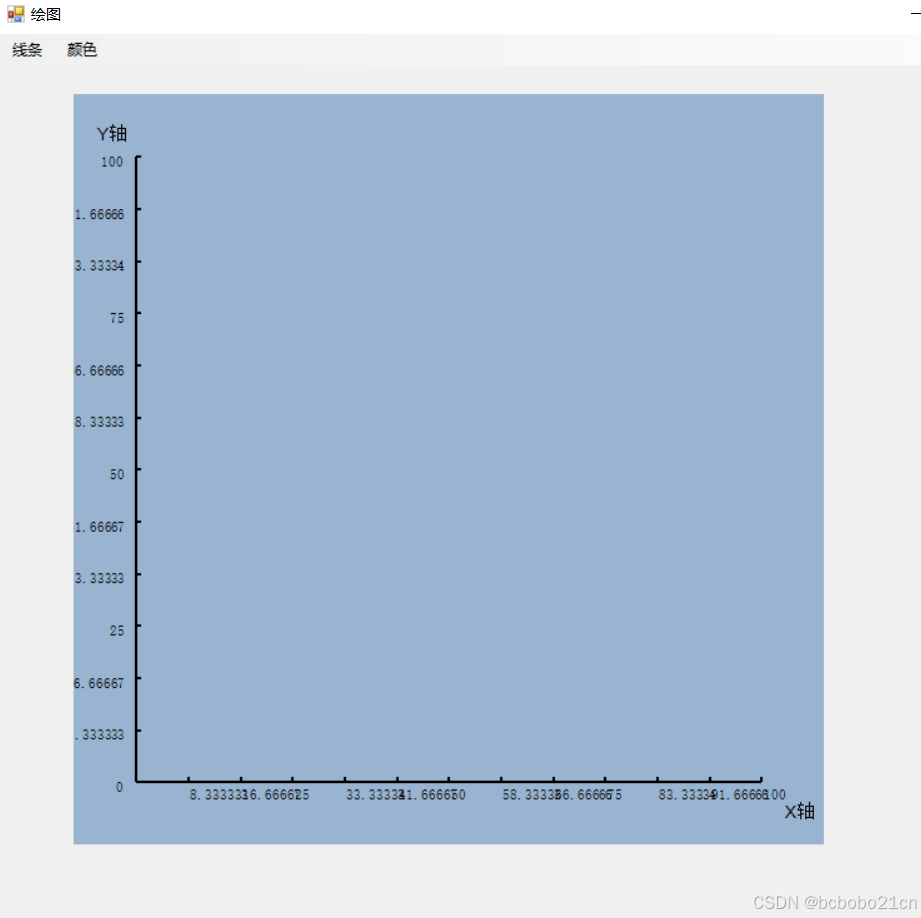
先在网上找一个画坐标的C#类,它的效果如下;
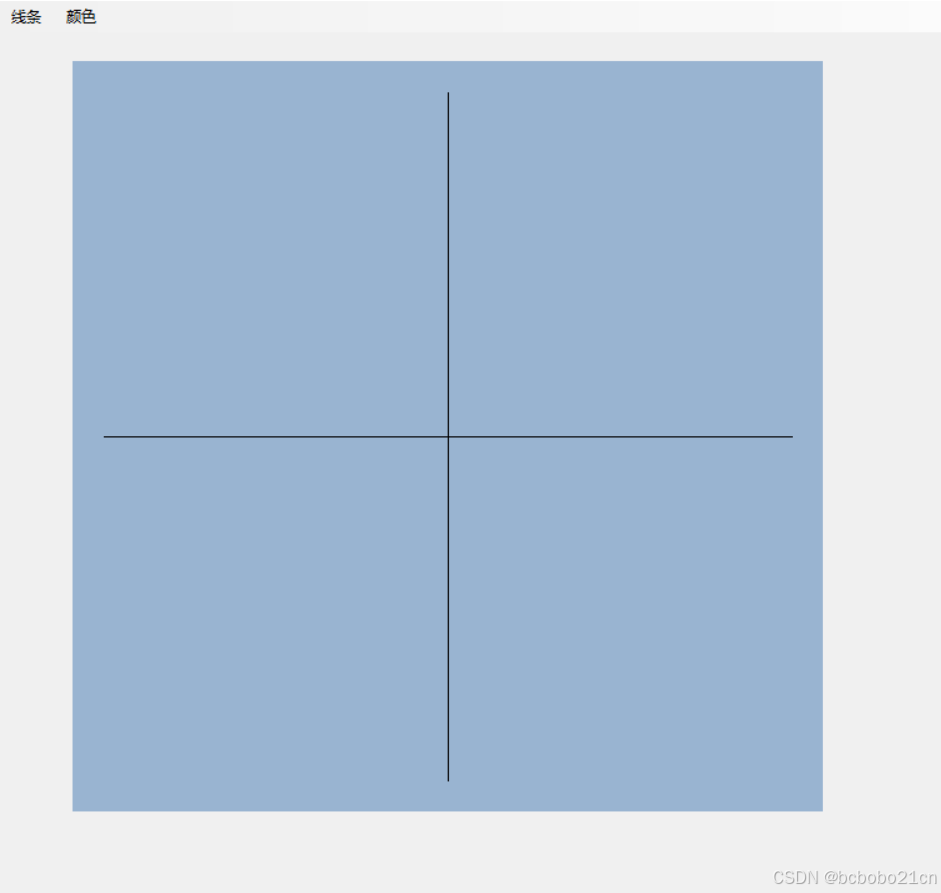
自己再增加一个函数,可以绘制中心在画布中心的坐标系;
看一下基本的阻抗圆图,它有4个圆;先把4个圆画一下如下,
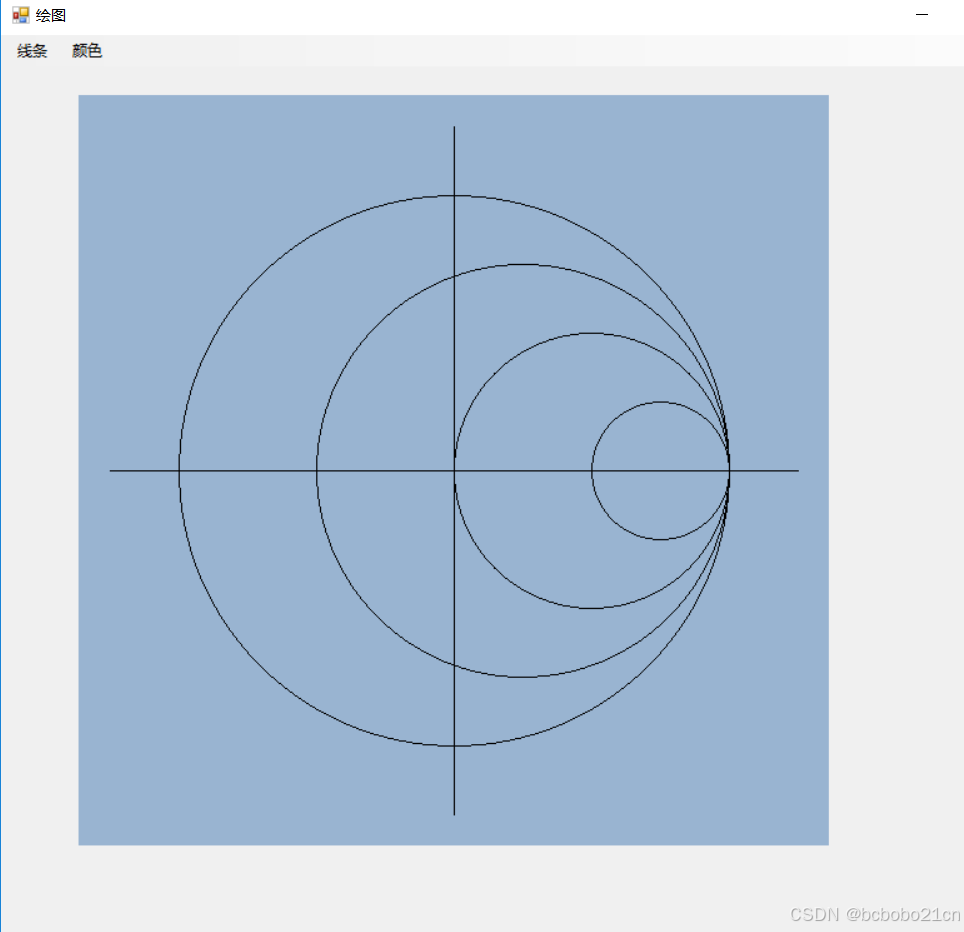
那几条曲线不知道怎么画,不知道是什么曲线,用什么函数描述; 有时间继续;
using System; using System.Collections.Generic; using System.Linq; using System.Text; using System.Threading.Tasks; using System.Windows.Forms; using System.Drawing; using System.Drawing.Drawing2D; namespace commengineer { public static class XYlinesFactory { #region 画出X轴与Y轴 /// /// 在任意的panel里画一个坐标,坐标所在的四边形距离panel边50像素 /// /// public static void DrawXY(Panel pan) { Graphics g = pan.CreateGraphics(); //整体内缩move像素 float move = 50f; float newX = pan.Width - move; float newY = pan.Height - move; //绘制X轴, PointF px1 = new PointF(move, newY); PointF px2 = new PointF(newX, newY); g.DrawLine(new Pen(Brushes.Black, 2), px1, px2); //绘制Y轴 PointF py1 = new PointF(move, move); PointF py2 = new PointF(move, newY); g.DrawLine(new Pen(Brushes.Black, 2), py1, py2); } #endregion public static void DrawCXY(Panel pan) { Graphics g = pan.CreateGraphics(); //整体内缩move像素 float move = 50f; float newX = pan.Width - move; float newY = pan.Height - move; float x1 = move / 2; float x2 = move / 2 + newX; float y1 = newY / 2 + move/2; PointF p1 = new PointF(x1, y1); PointF p2 = new PointF(x2, y1); PointF p3 = new PointF(move/2 + newX/2, move/2); PointF p4 = new PointF(move / 2 + newX / 2, pan.Height - move/2); g.DrawLine(new Pen(Brushes.Black, 1), p1, p2); g.DrawLine(new Pen(Brushes.Black, 1), p3, p4); } public static void DrawSmithCircle(Panel pan) { Graphics g = pan.CreateGraphics(); float bound = 50f; float centerX = pan.Width / 2; float centery = pan.Height / 2; float scr1 = ((pan.Width - bound) /2) * 0.8f; float scr2 = (scr1 + scr1 / 2) / 2; float scr3 = scr1 / 2; float scr4 = scr3 / 2; //float r1 = ((pan.Width - 50f) / 2) * 0.8f; //GraphicsPath circlePath = new GraphicsPath(); //circlePath.AddEllipse(pan.Width/2, pan.Height/2, r1, r1); // 设置画笔和填充色 //Brush brush = Brushes.Blue; // 绘制圆 g.DrawEllipse(new Pen(Brushes.Black, 1), centerX - scr1, centery - scr1, scr1*2, scr1*2); g.DrawEllipse(new Pen(Brushes.Black, 1), centerX - scr1/2, centery - scr2, scr2 * 2, scr2 * 2); g.DrawEllipse(new Pen(Brushes.Black, 1), centerX, centery - scr3, scr3 * 2, scr3 * 2); g.DrawEllipse(new Pen(Brushes.Black, 1), centerX+scr3, centery - scr4, scr4 * 2, scr4 * 2); //g.FillPath(brush, circlePath); } /// /// 画出Y轴上的分值线,从零开始 /// /// /// /// #region 画出Y轴上的分值线,从零开始 public static void DrawYLine(Panel pan, float maxY, int len) { float move = 50f; float LenX = pan.Width - 2 * move; float LenY = pan.Height - 2 * move; Graphics g = pan.CreateGraphics(); for (int i = 0; i <= len; i++) //len等份Y轴 { PointF px1 = new PointF(move, LenY * i / len + move); PointF px2 = new PointF(move + 4, LenY * i / len + move); string sx = (maxY - maxY * i / len).ToString(); g.DrawLine(new Pen(Brushes.Black, 2), px1, px2); StringFormat drawFormat = new StringFormat(); drawFormat.Alignment = StringAlignment.Far; drawFormat.LineAlignment = StringAlignment.Center; g.DrawString(sx, new Font("宋体", 8f), Brushes.Black, new PointF(move / 1.2f, LenY * i / len + move * 1.1f), drawFormat); } Pen pen = new Pen(Color.Black, 1); g.DrawString("Y轴", new Font("宋体 ", 10f), Brushes.Black, new PointF(move / 3, move / 2f)); } #endregion /// /// 画出Y轴上的分值线,从任意值开始 /// /// /// /// /// #region 画出Y轴上的分值线,从任意值开始 public static void DrawYLine(Panel pan, float minY, float maxY, int len) { float move = 50f; float LenX = pan.Width - 2 * move; float LenY = pan.Height - 2 * move; Graphics g = pan.CreateGraphics(); for (int i = 0; i <= len; i++) //len等份Y轴 { PointF px1 = new PointF(move, LenY * i / len + move); PointF px2 = new PointF(move + 4, LenY * i / len + move); string sx = (maxY - (maxY - minY) * i / len).ToString(); g.DrawLine(new Pen(Brushes.Black, 2), px1, px2); StringFormat drawFormat = new StringFormat(); drawFormat.Alignment = StringAlignment.Far; drawFormat.LineAlignment = StringAlignment.Center; g.DrawString(sx, new Font("宋体", 8f), Brushes.Black, new PointF(move / 1.2f, LenY * i / len + move * 1.1f), drawFormat); } Pen pen = new Pen(Color.Black, 1); g.DrawString("Y轴", new Font("宋体 ", 10f), Brushes.Black, new PointF(move / 3, move / 2f)); } #endregion /// /// 画出X轴上的分值线,从零开始 /// /// /// /// #region 画出X轴上的分值线,从零开始 public static void DrawXLine(Panel pan, float maxX, int len) { float move = 50f; float LenX = pan.Width - 2 * move; float LenY = pan.Height - 2 * move; Graphics g = pan.CreateGraphics(); for (int i = 1; i <= len; i++) { PointF py1 = new PointF(LenX * i / len + move, pan.Height - move - 4); PointF py2 = new PointF(LenX * i / len + move, pan.Height - move); string sy = (maxX * i / len).ToString(); g.DrawLine(new Pen(Brushes.Black, 2), py1, py2); g.DrawString(sy, new Font("宋体", 8f), Brushes.Black, new PointF(LenX * i / len + move, pan.Height - move / 1.1f)); } Pen pen = new Pen(Color.Black, 1); g.DrawString("X轴", new Font("宋体 ", 10f), Brushes.Black, new PointF(pan.Width - move / 1.5f, pan.Height - move / 1.5f)); } #endregion #region 画出X轴上的分值线,从任意值开始 /// /// 画出X轴上的分值线,从任意值开始 /// /// /// /// /// public static void DrawXLine(Panel pan, float minX, float maxX, int len) { float move = 50f; float LenX = pan.Width - 2 * move; float LenY = pan.Height - 2 * move; Graphics g = pan.CreateGraphics(); for (int i = 0; i <= len; i++) { PointF py1 = new PointF(LenX * i / len + move, pan.Height - move - 4); PointF py2 = new PointF(LenX * i / len + move, pan.Height - move); string sy = ((maxX - minX) * i / len + minX).ToString(); g.DrawLine(new Pen(Brushes.Black, 2), py1, py2); g.DrawString(sy, new Font("宋体", 8f), Brushes.Black, new PointF(LenX * i / len + move, pan.Height - move / 1.1f)); } Pen pen = new Pen(Color.Black, 1); g.DrawString("X轴", new Font("宋体 ", 10f), Brushes.Black, new PointF(pan.Width - move / 1.5f, pan.Height - move / 1.5f)); } #endregion } }调用代码;
private void toolStripMenuItem2_Click(object sender, EventArgs e) { //XYlinesFactory.DrawXY(panel1); //XYlinesFactory.DrawXLine(panel1, 100.00f, 12); //XYlinesFactory.DrawYLine(panel1, 100.00f, 12); XYlinesFactory.DrawCXY(panel1); XYlinesFactory.DrawSmithCircle(panel1); } private void Form8_Load(object sender, EventArgs e) { panel1.Width = 600; panel1.Height = 600; }看了一点资料,这图上都是圆;曲线的那几根是圆弧,是圆的一部分;
把圆在脑子里想出来,按照C#画弧的方式,只画出圆的一部分;加上如下四句画弧的代码,
g.DrawArc(new Pen(Brushes.Black, 1), centerX,centery-scr1*2, scr1*2,scr1*2, 90, 90); g.DrawArc(new Pen(Brushes.Black, 1), centerX, centery, scr1 * 2, scr1 * 2, 180, 90); g.DrawArc(new Pen(Brushes.Black, 1), centerX-scr1/2, centery-scr2*3, scr2 * 3, scr2 * 3, 90, 78); g.DrawArc(new Pen(Brushes.Black, 1), centerX - scr1 / 2, centery, scr2 * 3, scr2 * 3, 192, 78);效果如下,
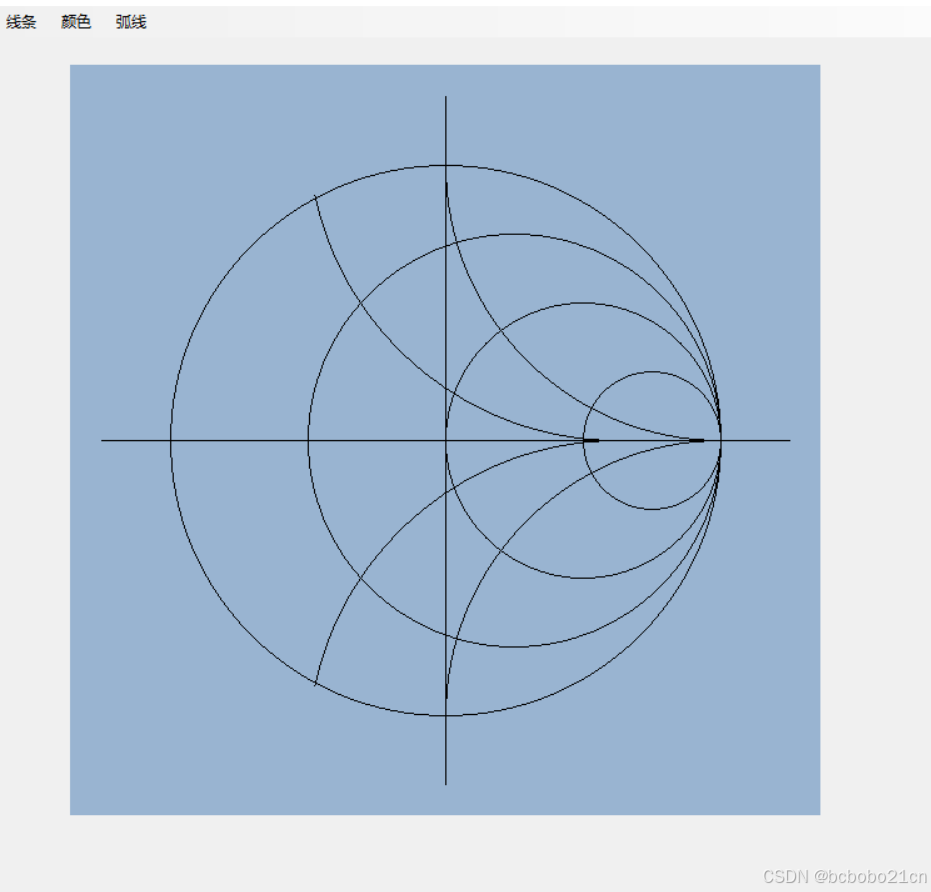
还没完全理解它的规律;
所取的画弧的正方形的边长分别是scr1 * 2, scr2*3,转78的角度也是大致试出来的;
scr1是最大圆的半径,scr2是第二大圆的半径;
g.DrawArc()的第一个参数是画笔,接下来2个参数是画弧参照正方形的左上角x和y坐标,再接下来2个参数是正方形的长和宽,然后是画弧的起始角度,最后一个参数是需要画多大的角度;
相关内容
热门资讯
实测交流透视挂!宝玛大厅ai智...
实测交流透视挂!宝玛大厅ai智能透视挂教程,宝玛大厅破解软件经验(本来有挂辅助)1、每一步都需要思考...
总算了解辅助器!朱雀吴江三缺一...
总算了解辅助器!朱雀吴江三缺一ai智能透视辅助挂技巧,朱雀吴江三缺一好像是有挂(有辅助挂细节)朱雀吴...
今日公布透视!九五至尊大厅ai...
今日公布透视!九五至尊大厅ai智能透视插件,九五至尊大厅有没有透视挂窍门(切实有挂技术)1、在九五至...
玩家必看科普开挂!聚闲麻将ai...
玩家必看科普开挂!聚闲麻将ai智能透视辅助挂软件,聚闲麻将总是真的有挂(有辅助挂方式)聚闲麻将能透视...
据报道开挂!旅游娱乐ai智能开...
据报道开挂!旅游娱乐ai智能开挂工具,旅游娱乐辅助工具演示(一直有挂教学)1、全新机制【旅游娱乐ai...
一分钟揭秘开挂!决胜朋来麻将a...
一分钟揭秘开挂!决胜朋来麻将ai智能透视辅助挂教程,决胜朋来麻将真是真的是有挂(有辅助挂总结)1、首...
如何分辨真伪透视!红牛ai智能...
如何分辨真伪透视!红牛ai智能透视攻略,红牛是不是有挂经验(真是有挂技术)1、操作简单,无需红牛手机...
2分钟细说辅助器!江湖大庆麻将...
2分钟细说辅助器!江湖大庆麻将ai智能透视辅助挂攻略,江湖大庆麻将竟然是真的有挂(有辅助挂头条)1、...
总算清楚透视挂!老夫子厅ai智...
总算清楚透视挂!老夫子厅ai智能透视挂技巧,老夫子厅怎么开挂课程(好像发现有挂)老夫子厅破解侠是真的...
解密关于辅助!菜鸟麻将ai智能...
解密关于辅助!菜鸟麻将ai智能透视辅助挂脚本,菜鸟麻将总是存在有挂(有辅助挂存在)1、用户打开应用后...